Photo Credit: me
The bug that only shows up when someone else uses your router
Background: one of my homelab boxes (ryzen1) has been the whole LAN’s internet gateway for a while — every device’s traffic gets policy-routed through a Tailscale exit node for latency reasons. It works, but it’s Arch, hand-maintained, imperative, and ryzen1 is supposed to be doing other things (GitLab, Home Assistant, Swarm manager). The plan has been to move that gateway role onto crucial, a NUC that’s already NixOS and already the LAN’s DHCP/DNS box.
I tried this with Netbird a few weeks ago and gave up. This time I tried it with Tailscale instead, and it worked — but only after finding a genuinely fun routing bug.
Round one: Netbird (a few weeks ago)
Short version, since this isn’t the interesting part: self-hosted Netbird, trying to get crucial to policy-route LAN clients through its own exit-node route. Hit three real bugs:
netbird routes select <exit-node>installs a blanketip rulethat’s supposed to exempt the box’s own control-plane traffic, but doesn’t reliably — selecting the route drops Netbird’s own management connection within seconds.- NixOS’s default strict reverse-path filter drops the resulting asymmetric traffic. Fixed permanently with
checkReversePath = "loose". - The one I never solved: even after fixing both of those, forwarded traffic from a real LAN client just… never arrived. Routing resolved correctly, firewall rules all fell through to accept, the WireGuard peer’s AllowedIPs were fine — and yet no conntrack entry ever appeared on the router for that connection. The packet seems to die before NAT even gets a chance to see it. Never found where.
Shelved it. Reverted the whole handover, put ryzen1 back as gateway.
Round two: Tailscale (this week)
ryzen1’s gateway logic was never in my NixOS config to begin with — it’s a hand-rolled systemd unit on Arch (gateway-setup.service) that does the sysctls, the iptables FORWARD/MASQUERADE rules, a policy-routing table for LAN traffic, and the actual tailscale up call. So step one was just transcribing it verbatim into a NixOS specialisation on crucial, interface names swapped, nothing clever:
specialisation.tailscale-gateway.configuration = {
  services.netbird.enable = lib.mkForce false;
  services.tailscale.enable = true;
  # ...systemd.services.gateway-setup with the same iptables/ip rule
  # commands ryzen1 runs, interface names substituted for crucial's own
};
Specialisations are nice for this — it’s a second boot-time config sitting right next to the normal one, switchable with one command, revertable with one command, nothing imperative to forget.
First test was crucial-only: don’t touch DHCP, don’t touch ryzen1, just confirm crucial itself could get online through the tunnel. It could. Good sign, wrong test — more on that in a second.
Found one real bug immediately: AdGuard’s upstream DNS servers are my ISP’s own IPv6 resolvers (only reachable directly off the WAN interface), and once the exit-node routing took over, AdGuard’s own queries started going out through the tunnel too and got no route back. Tailscale’s “route everything through the exit node” doesn’t distinguish “everything” from “my own local services’ traffic.” Fixed by pinning AdGuard to public resolvers specifically inside that specialisation.
Then did the actual DHCP cutover — stop ryzen1’s DHCP, bring up crucial’s, stop ryzen1’s gateway service. Worked immediately for new leases.
The actual bug
Here’s the part I liked. My own laptop/desktop (main) still had an old DHCP lease pointing at ryzen1. Forced a renewal so it’d pick up crucial — and then tried an actual connection through it as a real third-party client, not traffic crucial generated for itself.
It hung. Forever. curl timeout, traceroute all stars.
$ sudo grep 192.168.20.112 /proc/net/nf_conntrack
ipv4 2 tcp 6 58 SYN_RECV src=192.168.20.112 dst=1.1.1.1 sport=46154 dport=443
  src=1.1.1.1 dst=100.85.76.33 sport=443 dport=46154
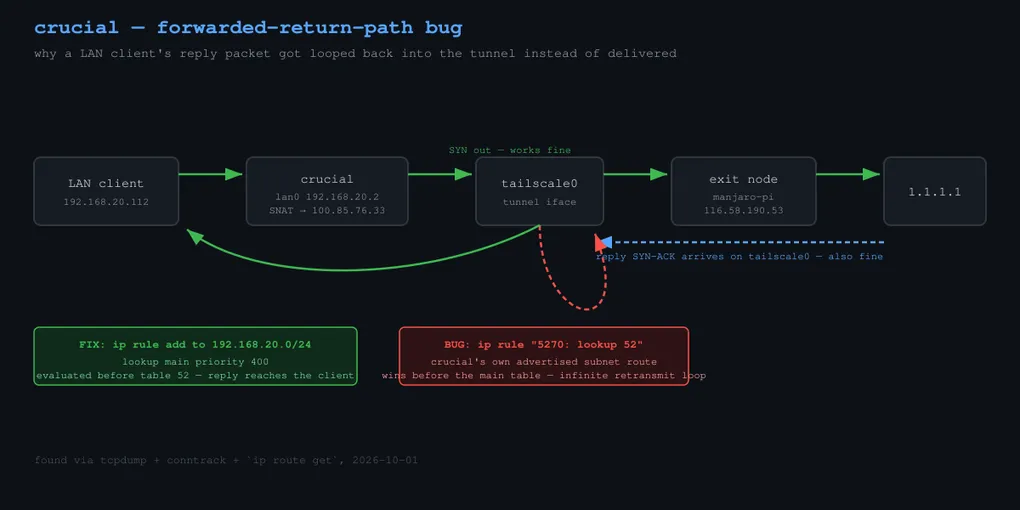
That’s actually encouraging — NAT is working, the source got correctly rewritten to crucial’s own Tailscale IP. So I pulled tcpdump in to watch both interfaces live:
lan0        In  192.168.20.112.43254 > 1.1.1.1.443: Flags [S]
tailscale0  Out 100.85.76.33.43254   > 1.1.1.1.443: Flags [S]
tailscale0  In  1.1.1.1.443 > 100.85.76.33.43254: Flags [S.]   <- reply arrives fine!
tailscale0  Out 1.1.1.1.443 > 192.168.20.112.43254: Flags [S.] <- ...and goes right back OUT tailscale0??
The SYN-ACK comes back correctly, gets un-NATed back to the client’s real address — and then gets routed straight back into the tunnel instead of out to lan0, where the client actually is. Forever. Every retransmit, same loop.
$ ip route get 192.168.20.112
192.168.20.112 dev tailscale0 table 52 src 100.85.76.33

$ ip rule show
...
500:  from 192.168.20.0/24 lookup 100
5270: from all lookup 52          <- this wins before the next one
32766: from all lookup main        <- which has the correct lan0 route
Root cause: crucial advertises 192.168.20.0/24 as a Tailscale subnet route (so remote peers can reach the LAN through it), and Tailscale auto-populates its own internal table 52 with a route for that exact subnet — via tailscale0. System rule 5270: lookup 52 is checked before the main routing table, so any packet destined back into the LAN gets vacuumed into the tunnel before the kernel ever gets to the perfectly correct on-link route sitting one rule down.
My existing policy-routing rule for the LAN subnet didn’t help, because it matches by source (from 192.168.20.0/24) — this is a destination match, a completely different axis. Fix was one more rule, just ahead of table 52:
ip rule add to 192.168.20.0/24 lookup main priority 400Tested, confirmed, made it permanent in the Nix config, redeployed. main now gets a real 200 in 0.24s through the tunnel.
The thing I keep coming back to: testing from the router itself never would have caught this. Locally-generated traffic doesn’t touch the FORWARD chain or table 52 the same way forwarded traffic does — it was invisible until I tested with an actual third machine acting as a real client. “It works when I try it from the box” is a much weaker claim than it sounds like.
Then round three, which went badly
Buoyed by that fix, I wanted to see if the same insight would unstick the old Netbird bug — maybe it has an analogous self-referential route table. Went to flip crucial back to its base config to go poke at Netbird’s routing tables.
The switch-to-configuration command tore down the gateway service (which, as part of its cleanup, removes crucial’s own LAN IP address) over the same SSH session I was running it from. The session died mid-command. The remote process got killed before it finished reconfiguring the interface. Crucial dropped off the network entirely — not reachable by SSH, not by ping, ARP resolution failing — for several minutes, with no remote console to fall back on.
Fell back to the one thing I knew would work: brought ryzen1’s old gateway service back up. Took about a minute. Household internet was never actually down for long, but crucial needed physical hands-on-keyboard to sort out.
Lesson, mostly for myself: a switch-to-configuration that tears down the very interface the SSH session is running over should probably always be backgrounded (nohup/setsid) on a box you only have remote access to. Routine config changes that happen to touch the management interface are exactly the ones that bite you when they’re not routine.
Netbird retest: still pending. Current state: ryzen1/Tailscale is gateway again, crucial has a working, tested, declarative Tailscale-gateway specialisation sitting ready for next time.
Round four: it works, until you’re mid-game
A couple weeks later I actually switched the household over and started using the Tailscale-gateway specialisation for real — DHCP pointed at crucial, LAN traffic policy-routed through the exit node (manjaro-pi, a Raspberry Pi at a different home). The actual point of this whole project was gaming latency, so naturally the first real test was a League of Legends match. It disconnected me mid-game.
tailscale status showed the exit-node peer had fallen off a direct P2P connection and was relaying through DERP — and the relay region had drifted to Hong Kong instead of Tokyo. Restarted tailscaled on crucial; relay snapped back to Tokyo immediately, which felt like a fix. It wasn’t. Same disconnect, same signature, a few minutes into the next game: direct connection drops, falls back to DERP, DERP loses track of the peer, and the client just stalls — anywhere from a couple seconds to the better part of a minute — before it reconnects. Long enough to get you killed in lane, which is the only metric that actually mattered here.
Two residential NAT connections trying to hold a direct WireGuard session isn’t a stable arrangement, and the fallback it degrades to isn’t much better. Restarting the daemon doesn’t fix either of those; it just resets the clock until the next degrade.
Round five: stop routing the whole house for one PC’s latency
That’s when the actual architecture question got obvious: why was I forcing every device on the LAN through a home-based exit node, to fix the latency of one gaming PC? I already had a small VPS rented (WebARENA Indigo, Tokyo, NTT backbone) for exactly this kind of thing. The router-level approach made sense when the plan was “VPN the whole LAN through something with good peering” — but the thing with good peering was a residential Pi on someone’s home connection, and the thing that actually had good peering was the VPS, sitting unused for this purpose.
New plan: stop routing the LAN at all. Point crucial back to a plain direct-NAT router — no VPN in the path for anything — and run a Netbird client directly on the gaming PC, pointed at the VPS as its own personal exit node. Nothing else on the LAN needs this; nothing else gets it.
Reverting crucial turned up two more bugs, both self-inflicted, both informative:
First, sudo /run/current-system/bin/switch-to-configuration switch silently did nothing. /run/current-system points at whatever is currently booted — if that’s the tailscale-gateway specialisation, running switch-to-configuration through that path just re-applies the specialisation you’re trying to get out of. The base generation lives at /nix/var/nix/profiles/system regardless of what’s booted:
$ readlink -f /run/current-system
/nix/store/...-specialisation-tailscale-gateway...

$ readlink -f /nix/var/nix/profiles/system
/nix/store/...-nixos-system-crucial...   # different path — this is the one to switch to
Fixed by running switch-to-configuration through the second path instead.
Second, and more annoying: once the correct switch actually ran, crucial fell completely off the LAN. lan0 was link-up but had no IPv4 address at all — had to find it on its other NIC (the Belkin-side one, via an ARP sweep of 192.168.0.0/24) just to SSH back in.
Root cause was the same declarative/imperative seam that bit me in round three, from the other direction: gateway-setup.service’s ExecStop runs ip addr del <lan-ip> dev lan0 unconditionally, as cleanup. But the LAN IP is declared identically in both the specialisation and the base config — same value, both generations — so NixOS’s activation script looks at that line, sees nothing changed, and never reassigns it. The service’s imperative teardown deletes something the declarative config never notices is missing, because from its point of view, nothing changed. Manual fix was quick (ip addr add 192.168.20.2/24 dev lan0, restart dnsmasq/AdGuard), but the actual fix belongs in the Nix config — that ExecStop shouldn’t delete an address the base config still wants present.
With crucial back to plain direct NAT, the gaming PC side was next. Netbird doesn’t have a single “exit node” toggle the way Tailscale does — exit nodes are just a Network Route advertised by a peer, scoped to a Distribution Group, and clients opt in to a route rather than flip a global switch:
netbird networks list
netbird networks select "Exit Node (i-53100000788084)"
First attempt: route not available. Turned out to be a Distribution Group mismatch on the self-hosted management side — the exit-node route wasn’t scoped to a group that included the gaming PC’s peer. Fixed in the vh.bluetree.jp dashboard, not from the client.
Result
Netbird client on the gaming PC, talking directly to the VPS exit node, reports 16ms. League of Legends ping, which was stalling out entirely under the router-based Tailscale setup, is sitting at a steady 20ms.
The nice side effect of this shape: crucial is no longer in the gaming PC’s path at all, by design — so when something needs checking, the only machine worth looking at is the gaming PC itself (netbird status --detail against the exit-node peer), not the router. Same lesson as round two, mirrored: testing — or in this case, monitoring — from the box that isn’t actually carrying the traffic anymore tells you nothing useful.